
Grocery Delivery App Development: Building the Digital Grocery Store
Grocery delivery app development is the specialized process of creating digital platforms that connect customers with groceries and daily essentials, enabling them to shop online and receive deliveries at their doorstep . The global online grocery sector, valued at approximately $286 billion in 2021, is projected to exceed $1 trillion by 2027, driven by shifting consumer habits toward instant, mobile-first shopping .
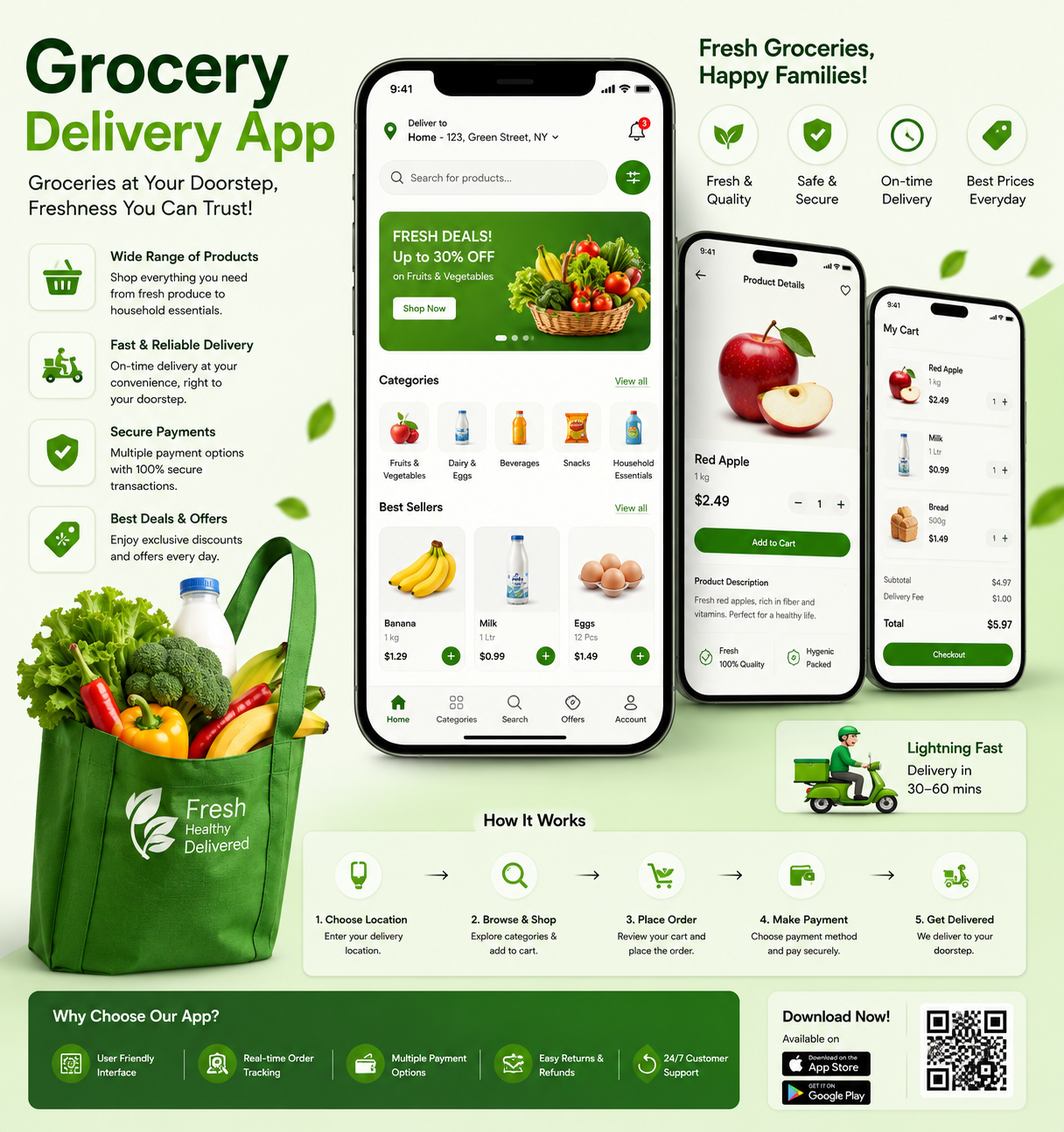
What is a Grocery Delivery App?
A grocery delivery app is a digital platform that transforms the traditional shopping experience by enabling customers to browse, select, and order groceries online . These apps provide convenience and speed, allowing customers to order food anywhere, anytime using their mobile devices . Beyond customer experience, they provide key operational data to pickers, delivery drivers, and administrators overseeing inventory and analytics .
How It Works: The Instant Delivery Model
The instant delivery model, exemplified by platforms like Blinkit, Swiggy Instamart, and Zepto, has fundamentally changed grocery shopping . Unlike traditional retailers that deliver from large supermarkets or distant warehouses, these platforms operate out of small storage units called "dark stores" embedded deep inside residential neighbourhoods .
The operation follows a tightly choreographed process:
- Order Placement: A customer places an order through the app.
- Dark Store Picking: The order appears on a screen inside a nearby dark store (typically 2-3 kilometers from the customer). Workers quickly pick, scan, and pack items .
- Simultaneous Dispatch: Delivery riders collect packed orders almost in sync with packers—every step is planned to reduce time, even by seconds .
- Rapid Delivery: Riders deliver to the customer's doorstep, often within 10–20 minutes.
In practice, the entire process can take as little as 16 minutes from order to doorstep . This speed is driven by intense competition between players like Blinkit, Swiggy Instamart, and Zepto, who are racing to capture a growing market . Blinkit's quick commerce sales, for example, are projected to reach ₹268 billion in 2026—a fivefold jump from ₹52 billion in 2025 .
Delivery Models
Grocery delivery apps generally offer one or more of these delivery models:
- On-Demand: Immediate delivery within hours (e.g., Instacart).
- Scheduled: Pre-planned delivery slots for convenience.
- Hybrid: Combines on-demand and scheduled options for flexibility .
Business Models
The model you choose dictates how you generate revenue and structure operations .
Inventory Model vs. Aggregator Model
ModelDescriptionExamplesKey ConsiderationsInventory ModelThe app operator manages its own inventory.WalmartRequires significant investment in warehouse space and logistics .Aggregator ModelThe app connects users with local stores and suppliers.Instacart, ShiptHighly cost-effective with less upfront investment, but success is heavily dependent on third-party reliability .
Revenue Models
Several monetization strategies exist, each with its own pros and cons :
- Subscription: Charges users recurring fees for premium features or free delivery. Provides steady revenue and drives long-term loyalty, but requires consistent value delivery to avoid churn.
- Freemium: Provides free access to the app, with upgrades to paid features. Broad adoption with upsell opportunities, but limits revenue from the majority of users.
- Per-Order Revenue: Charges a fee per transaction or delivery. Simple to implement and aligns costs with usage, but may deter frequent users and result in unpredictable revenue.
White-Label vs. Custom Solutions
- White-Label Platforms: Enable quick deployment and save on development costs, but operate within technical constraints that may not align with your goals .
- Custom Solutions: Come with higher upfront costs but offer greater flexibility, control over branding, and potentially higher ROI over time . The key to success here is effective development; if your app is complicated, slow, or buggy, customers won't use it .
Key Features of Successful Grocery Delivery Apps
A high-performing grocery app balances convenience for users, smart tools for admins, and practical functions for delivery partners .
For Customers
- User-Friendly UI: Clean design and easy navigation .
- Smart Product Search & Filtering: Advanced filters to quickly locate items, including dietary preferences .
- Real-Time Order Tracking: Live tracking of orders, reducing post-checkout uncertainty .
- Scheduled or Instant Delivery: Flexibility to choose delivery timing .
- Multiple Payment Options: Support for cards, digital wallets, net banking, and cash on delivery .
- Push Notifications: Timely alerts for promotions, discounts, and order status .
- Reordering: One-tap options for frequent purchases, speeding up shopping .
- Personalization: AI-driven suggestions based on user preferences and purchase history .
For Admins
- Product & Inventory Management: Real-time updates on product catalogs, stock levels, and categories .
- Order Dashboard & Analytics: Track orders, delivery status, and gain business insights .
- User & Delivery Management: Manage customers and delivery partners in one place .
- AI-Powered Inventory Management: Predict demand, proactively reorder stock, and reduce overstock and wastage .
For Delivery Partners
- Route Optimization: Offers the best delivery routes to reduce time and fuel costs .
- Order Status Updates: Allows drivers to accept or reject orders and update status .
- Delivery History and Earnings: View past deliveries and track earnings anytime .
Development Process
A clear process turns a promising idea into a successful product :
1. Discovery & Business Analysis
Evaluate the marketplace, competitors, and opportunities. Examine successful brands like Instacart, Walmart, or Uber Eats. Define your value proposition, user journeys, and key features .
2. UI/UX Design
Designers transform research into a seamless, intuitive shopping experience. This involves user journey mapping, creating wireframes, and developing prototypes to visualize how the app will look and feel .
3. Backend & Frontend Development
Developers build the technical foundation:
Frontend Technologies:
- React Native: Cross-platform development, one codebase for iOS and Android .
- Swift (iOS): Native development for iOS .
- Kotlin (Android): Native development for Android .
Backend Technologies:
- Node.js: Manages orders, product administration, and user authentication .
- Django: Python framework for quick development .
- MongoDB / PostgreSQL: Databases for flexible data storage and complex queries .
- Firebase: Real-time database capabilities and user management .
4. Real-Time Tracking Integration
Integrate reliable map APIs like Google Maps to show customers where their orders are in real time. Use notification services like Firebase or OneSignal to send order status updates .
5. Payment Gateway Integration
Use secure payment gateways to prevent cart abandonment and support multiple payment methods—credit/debit cards, digital wallets, and payment services like Stripe or PayPal .
6. QA Testing & Performance Optimization
Thorough testing ensures functionality, performance under heavy traffic, security, usability, and cross-device compatibility. Beta testers help identify issues that might not come up in controlled settings .
7. App Launch
Publish the app on the Apple App Store and Google Play Store. Effective marketing is essential for attracting users—social media campaigns, influencer partnerships, and paid search through Facebook Ads and Google Ads can drive downloads .
8. Post-Launch Support & Updates
Build a robust analytics system to monitor user behavior and performance. Collect user feedback regularly and provide scheduled updates to maintain a fresh app, boost engagement, and drive sales growth .
Cost Considerations
The cost of grocery delivery app development varies depending on several factors, including features, complexity, platform, and the development team's location and experience . Here is a general guide:
- Basic App: With essential features (user registration, product listings, cart, checkout, payment gateway integration), the cost can range from $8,000 to $25,000 .
- Advanced App: With real-time tracking, AI-based recommendations, in-app chat, loyalty programs, and a scalable backend, the cost can range from $20,000 to $60,000+ .
Key Cost Drivers:
- UI/UX Design: Custom design increases engagement but adds cost .
- Feature Set: The more complex and numerous your features, the higher the cost .
- Back-End Integration: Managing inventory, user data, and orders securely requires a robust backend .
- Third-Party Services: Integration with payment gateways, push notifications, and location services incurs additional fees .
- Maintenance & Updates: Ongoing support, bug fixes, and feature enhancements are ongoing costs .
Outsourced Development Options:
Freelance platforms offer packaged development services at varying price points:
TierCostDelivery TimeStarter~$3,00025 daysStandard~$7,00035 daysAdvanced~$10,00055 days
Source: Upwork service listings .
Conclusion
Grocery delivery app development is a strategic opportunity in a rapidly growing market . Success depends on understanding the business model—inventory-led or aggregator—and balancing it with the right monetization strategy . The core of the platform lies in its features: a seamless user experience for customers, robust inventory and order management for admins, and efficient route optimization for delivery partners .
As the market evolves toward real-time fulfillment, driven by dark-store networks and AI-powered forecasting, scalability and operational efficiency are critical . Partnering with an experienced development team and focusing on delivering genuine value to customers will determine long-term success in this competitive space.